
Best Gaming Desk Setup Ideas for Competitive Players
772 views
A competitive gaming setup can look impressive and still play terribly.
The mouse runs out of pad halfway through a 180-degree turn. Your monitor sits slightly off-center. The keyboard is shoved too far forward, forcing your shoulders up. Cables snag your arm at exactly the wrong moment.
Then there's the classic problem: buying a faster mouse and a 360Hz monitor while the actual desk arrangement is fighting you.
For competitive players, the better approach is to treat the desk as part of the performance system. The goal isn't maximum RGB. It's repeatable movement, low distraction, predictable input, clear sightlines, and a comfortable position you can hold for an entire session.
This guide takes that performance-first angle rather than another generic RGB gaming-room tour, making it a practical companion for players who already understand the basics and want to refine the setup around competitive play.
Start with the mouse, not the decorations
Your mouse needs more usable territory than most gaming desks provide.
That's especially true for low-sensitivity FPS players. A 400–800 DPI setup with a large in-game sensitivity range can require substantial physical movement, so a compact 30 × 25 cm pad quickly becomes an obstacle rather than an accessory.
A desk mat around 900–1000 mm wide gives the keyboard and mouse enough shared space while leaving room for broad swipes. Some players prefer an even larger 1200 mm surface.
Don't automatically choose the fastest-feeling pad, either. A control-oriented cloth surface can make sense for tactical shooters where tiny corrections matter, while a faster surface may suit players who constantly make large tracking movements.
The useful question is simple:
Can you make your biggest normal mouse movement without hitting the keyboard, monitor stand, or edge of the desk?
If not, rearrange the desk before buying another mouse.
Polling rate deserves similar restraint. Modern competitive mice can go far beyond the old 1000Hz standard; Razer's Viper 8KHz, for example, introduced a true 8000Hz polling rate. Higher polling can reduce the interval between mouse reports, but it also increases the number of reports the PC must process.
A practical competitive setup might therefore use:
1000Hz for a simple, reliable baseline.
2000–4000Hz on a sufficiently capable system.
8000Hz if your game, CPU, firmware, and frame-time behavior remain stable.
Don't chase the number just because it's printed on the box.
Give the monitor a fighting position
Your primary gaming monitor should sit directly in front of you.
Not slightly left because the second screen looked symmetrical. Not angled toward a window because the cable was shorter.
OSHA's workstation guidance recommends positioning the primary display directly in front of the user and at least 20 inches away, with the top line of the screen at or below eye level. It also recommends positioning the display perpendicular to windows to reduce glare.
Competitive play adds another consideration: eye travel.
If you're playing Counter-Strike 2, VALORANT, Overwatch 2, Apex Legends, or another fast FPS, you want the important visual information inside a relatively compact field of view. A giant ultrawide isn't automatically an advantage. Neither is stacking three monitors around your head.
For a dedicated competitive station, a single 24–27-inch high-refresh display often makes more sense than a huge multi-monitor arrangement.
Refresh rate should match the game
A 240Hz monitor refreshes every 4.17 milliseconds. A 360Hz panel drops that interval to about 2.78ms, while 500Hz reaches 2ms.
Those differences aren't magic. Your PC still has to produce the frames.
A 500Hz display paired with a system that spends much of a match below 300 FPS isn't suddenly a 500Hz competitive experience. Frame-time consistency matters just as much as the headline refresh rate.
Variable-refresh technologies also deserve attention. VESA maintains standards for Adaptive-Sync and DisplayHDR, so look beyond marketing labels and check exactly what a monitor supports.
Keep the keyboard low and the mouse close
This is one of those changes that looks boring and feels fantastic.
Place the keyboard directly in front of you, then move it slightly left if doing so gives your mouse more room. A tenkeyless or 60–75% keyboard can be useful here, not because smaller keyboards make you aim better, but because removing unused keys creates valuable mouse territory.
Your shoulders shouldn't be creeping toward your ears.
OSHA recommends keeping the keyboard directly in front of you, with relaxed shoulders, elbows close to the body, and wrists aligned with the forearms. It also specifically recommends placing the mouse close to the keyboard to reduce reaching.
That advice translates surprisingly well to esports.
If you play with a very low sensitivity, don't let the keyboard occupy the center of the desk while your mouse hangs off the right edge. Rotate or shift the entire input area until your forearm has a clear path.
The best desk depth is easy to underestimate
A desk that's too shallow creates a strange chain reaction.
The monitor gets pushed backward. The keyboard follows. Your mouse ends up near the front edge. Then you lean forward because everything feels slightly too far away.
A depth around 70–80 cm is a strong starting point for a dedicated gaming desk, particularly if you're using a monitor arm and a large mouse pad. The exact figure depends on monitor size, viewing distance, chair position, and your preferred posture.
OSHA's purchasing guidance calls for enough desk depth to accommodate a monitor at least 20 inches from the eyes, plus enough surface for the keyboard and pointing device.
There's a useful trick here: measure before buying.
Sit in your normal gaming position. Put your monitor where you naturally want it. Then measure the distance from your eyes to the front edge of the desk.
That number tells you far more than a product listing saying "extra-large gaming surface."
Build a cable system that doesn't touch your arm
Cable management isn't just cosmetic for competitive players.
A loose DisplayPort cable can tug against the monitor. A mouse cable can catch on a desk edge. A charging lead can end up directly beneath the forearm.
The cleanest solution is usually a single under-desk cable tray plus a few short Velcro straps.
Run power cables separately from your mouse and keyboard cables where practical. Leave a small service loop behind the monitor rather than pulling everything tight. If you use a monitor arm, route the display cable through the arm only after you've tested its full range of movement.
One common mistake: making the cables look perfect while leaving no slack.
Then you raise the monitor by 5 cm and discover the DisplayPort connector is under tension.
Not ideal.
Use a monitor arm—but don't overcomplicate it
A good VESA monitor arm can free a surprising amount of desk space.
It also makes monitor positioning easier. You can move the screen forward for a tournament-style session, then push it back when using the desk for browsing or work.
Check the monitor's VESA pattern before buying. 100 × 100 mm is common, but you shouldn't assume it.
Dual arms are useful if you actually need a second display. For competitive gaming, I'd place the gaming monitor centrally and position the secondary screen off to one side at a modest angle.
Don't center the Discord monitor.
That's how you end up turning your head every few seconds.
Lighting should help, not compete
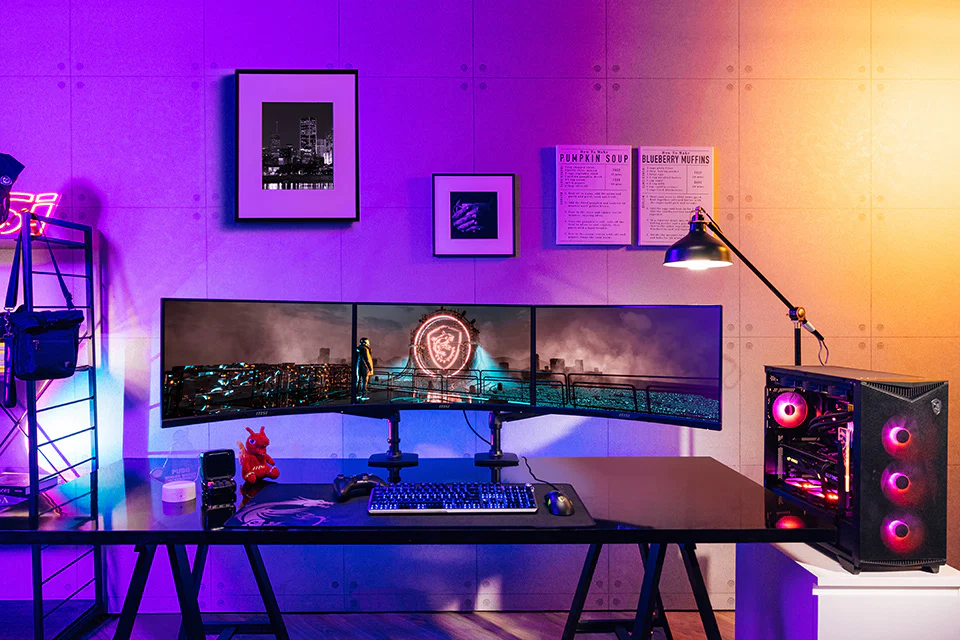
RGB lighting looks great in photographs. During a serious match, uncontrolled lighting can become visual clutter.
A better gaming desk setup uses soft ambient light behind or beside the monitor, with the screen itself remaining the brightest visual target.
Window placement matters too. OSHA recommends arranging screens at right angles to windows and using diffuse lighting to reduce reflections and visual strain.
Bias lighting behind the display can be particularly useful in a dark room because it prevents the monitor from becoming an isolated rectangle of intense brightness.
You don't need a neon wall.
A small lamp and sensible monitor brightness can do the job.
Treat latency as a system, not a mouse specification
Competitive players often obsess over mouse polling rate while ignoring the rest of the click-to-photon chain.
NVIDIA describes system latency as the time between the peripheral action and the resulting pixels appearing on the display. Its Reflex platform can synchronize CPU and GPU work to reduce latency, while compatible Reflex Analyzer displays can measure parts of the end-to-end path.
That changes how you should evaluate a desk setup.
Your performance chain is roughly:
Mouse → USB → game/OS → CPU/GPU rendering → display connection → monitor → pixels
A fast mouse doesn't fix a badly configured rendering pipeline.
On NVIDIA hardware, check whether the competitive game supports NVIDIA Reflex and use the game's implementation where appropriate. AMD users should check Radeon Anti-Lag 2 support for their specific title; AMD says Anti-Lag 2 requires developer integration and currently supports selected games rather than functioning as a universal switch.
Windows 11 also includes "Optimizations for windowed games," which applies to compatible DirectX 10 and DirectX 11 games running in windowed or borderless modes and can reduce frame latency through the newer flip-model presentation path.
Don't blindly enable every latency-related option, though. Test.
Three competitive desk layouts that actually work
Setup | Best for | Key arrangement |
|---|---|---|
Dedicated FPS | CS2, VALORANT, Rainbow Six Siege | 24–27" high-refresh monitor, TKL/60% keyboard, oversized mouse pad, minimal accessories |
Hybrid competitive | FPS + streaming + everyday use | 27" primary display, secondary monitor angled to the side, monitor arm, deeper desk |
Tournament-style | Maximum focus | Single display, minimal lighting, no speakers or clutter, generous mouse clearance |
The dedicated FPS layout is my default recommendation.
It eliminates distractions. More importantly, it leaves a huge uninterrupted area for the mouse.
Your chair matters more than another accessory
A desk cannot compensate for a chair that puts your hips too low or leaves your back unsupported.
Set the chair first. Then set the desk.
Your feet should be supported, your elbows should sit comfortably near the keyboard, and your wrists shouldn't have to bend upward to reach the keys. OSHA's workstation guidance emphasizes neutral wrist positioning, supported feet and back, and adjustability rather than prescribing one universal posture.
That's worth emphasizing.
There isn't one magical "gamer posture."
You need a position that lets you stay relaxed while still having enough freedom to move the mouse aggressively.
A practical $500 upgrade order
If your existing desk is functional, don't replace everything at once.
Spend in this order:
Large mouse pad — roughly $20–$50.
Monitor arm — roughly $30–$100.
Proper chair adjustment or chair upgrade — budget varies dramatically.
High-refresh monitor — often the biggest hardware expense.
Keyboard and mouse — replace only when your current peripherals are actually limiting you.
Cable management — $10–$40 can be enough.
Lighting and aesthetics — last.
That ordering isn't glamorous.
It works.
A $30 cable tray can improve a desk more than another $150 RGB accessory when the existing cable keeps catching your arm.
Competitive gaming desk setup FAQ
What size desk is best for competitive gaming?
For most players, around 140–160 cm wide and 70–80 cm deep is a strong target. Width gives you room for a large mouse pad and monitor while depth helps maintain a sensible viewing distance without pushing the keyboard toward the edge.
Is a 240Hz monitor enough for competitive gaming?
Yes. A 240Hz display is already extremely fast, with a refresh interval of about 4.17ms. Moving to 360Hz or 500Hz can reduce the interval further, but the benefit depends on your actual frame rate, game, hardware, and ability to exploit the additional responsiveness.
Should my keyboard be angled?
A slight angle is fine if it gives your mouse more room or feels natural. Avoid assuming that a dramatic tilt is automatically better. The important variables are neutral wrists, relaxed shoulders, and enough space for your mouse movement.
Is 8000Hz mouse polling worth it?
Sometimes. It can reduce the time between reports compared with 1000Hz, but the practical benefit depends on the game and PC. Test 1000Hz, 2000Hz, 4000Hz and 8000Hz if your mouse supports them, then keep the setting that produces stable frame times and feels consistent.
Should I use two monitors for competitive gaming?
Use a second monitor if you need it for Discord, streaming, recording, guides, or other tasks. For pure competitive focus, one centrally positioned display is often cleaner. Put the secondary screen to the side rather than forcing your primary display off-center.
The final 10-minute setup check
Before your next ranked session, sit down and make the boring adjustments.
Center the monitor. Clear the mouse path. Put the keyboard where your shoulders relax. Check that no cable touches your forearm. Verify the display is running at its intended refresh rate. Confirm your game's latency settings haven't quietly reverted after an update.
Then play.
If you keep reaching for something, move it.
If something catches your arm, fix it.
If you repeatedly notice the monitor edge, keyboard, cable, or desk corner during a match, the setup is telling you something.
Build the desk around the movements you actually make—not around how a gaming setup looks in a photograph.
gaming desk setup ideas
competitive gaming setup
esports desk setup
gamer room inspiration
pro gaming station
Found this helpful? Share it!