
Dual Monitor vs Ultrawide: Which Gaming Setup Wins?
225 views
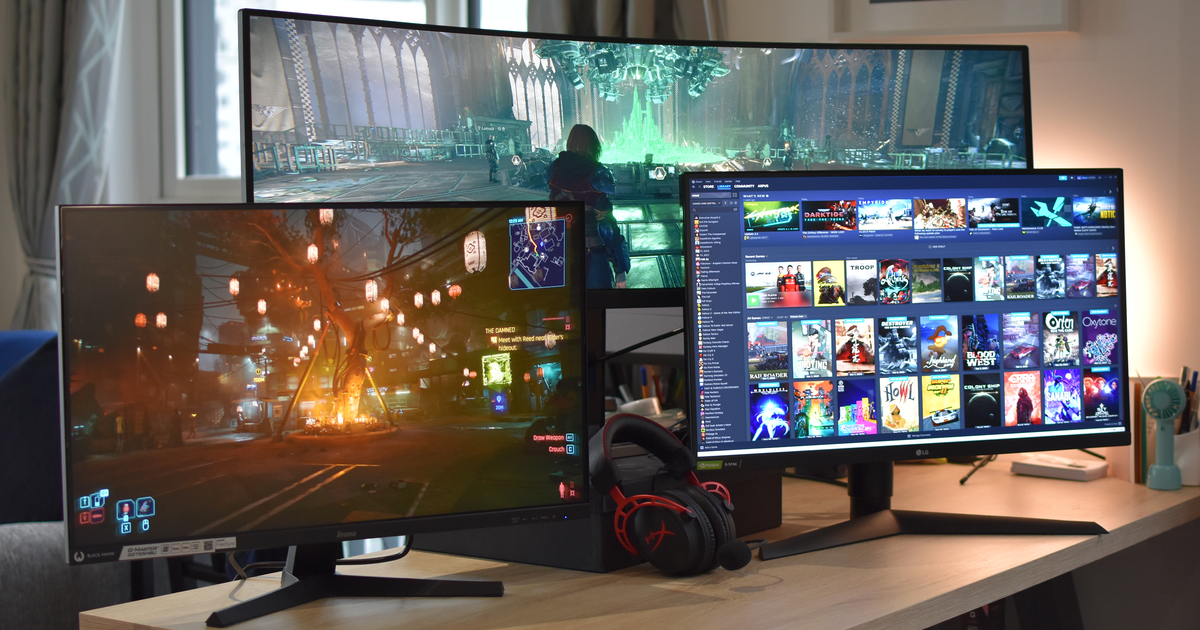
Buying a new gaming display often starts with a simple question: should you get two monitors or invest in one ultrawide display? Both setups promise more screen space than a standard monitor, but they create very different gaming experiences.
The right choice depends on more than just screen size. Your favorite game genres, graphics card, desk space, budget, and even how you use your PC outside gaming all play a role. This guide breaks down the strengths and weaknesses of each option so you can confidently choose the setup that fits your gaming style.
What Is a Dual Monitor Setup?
A dual monitor setup uses two separate displays connected to the same computer. The most common arrangement is two matching 24- or 27-inch monitors placed side by side.
Many gamers use one monitor for gameplay while keeping the second display available for:
Discord or voice chat
Twitch streams
Music controls
Game guides or maps
Monitoring hardware performance
Streaming software
Because each screen works independently, multitasking is one of the biggest advantages of this setup.
What Is an Ultrawide Monitor?
An ultrawide monitor has a wider aspect ratio than a traditional 16:9 display. Most gaming ultrawide monitors use a 21:9 aspect ratio, while super ultrawide models stretch to 32:9.
Instead of placing two displays together, an ultrawide creates one continuous screen without a bezel running through the middle.
Many ultrawide gaming monitors are also curved, helping maintain a more consistent viewing distance across the display.
Why Gamers Consider Ultrawide Displays
One of the biggest attractions is immersion.
Games that support ultrawide resolutions display a larger horizontal field of view, allowing players to see more of the game world without splitting the image across two monitors. Racing games, flight simulators, open-world adventures, and many RPGs benefit particularly well from this wider perspective.
Another advantage is the clean, uninterrupted workspace. There's no bezel breaking up the image, making cinematic games feel more natural.
Why Many Gamers Still Prefer Dual Monitors
Although ultrawide displays have become increasingly popular, dual monitors remain a favorite among gamers who also use their PCs for work, streaming, or content creation.
Instead of constantly switching windows, you can dedicate each display to a specific task.
For example:
Main monitor: game
Second monitor: browser, YouTube, Discord, OBS, or chat
This flexibility is difficult to match with a single display, even an ultrawide.
Dual Monitor vs Ultrawide at a Glance
Feature | Dual Monitors | Ultrawide Monitor |
|---|---|---|
Gaming immersion | Good | Excellent |
Multitasking | Excellent | Very good |
Screen interruption | Bezel between displays | None |
Streaming convenience | Excellent | Good |
Desk cable management | More cables | Cleaner setup |
GPU performance demand | Lower if gaming on one monitor | Higher due to wider resolution |
Movie watching | Great on one screen | May show black bars with 16:9 content |
Productivity | Excellent | Excellent |
Gaming Performance Differences
Choosing between these setups isn't just about appearance. Performance matters too.
Ultrawide requires more graphics power
An ultrawide monitor contains significantly more pixels than a standard 1440p display. For example, a common 3440×1440 ultrawide renders roughly one-third more pixels than a standard 2560×1440 monitor, increasing GPU workload and potentially lowering frame rates if your graphics card isn't powerful enough.
If you enjoy demanding AAA games with maximum graphics settings, you'll likely need a stronger GPU to maintain high frame rates.
Dual monitors don't reduce gaming performance by themselves
Running a second monitor for Discord, music, or web browsing usually has only a modest effect on gaming performance. Your game still renders primarily on the main display.
If you're not gaming across both monitors simultaneously, the performance impact is generally much smaller than rendering a native ultrawide resolution.
Immersion: Where Ultrawide Shines
If immersion is your top priority, ultrawide monitors are difficult to beat.
Games with proper ultrawide support offer:
Wider peripheral vision
More cinematic presentation
Better sense of speed in racing games
Larger visible environments in exploration games
Genres that benefit most include:
Racing simulators
Flight simulators
Open-world adventures
RPGs
Strategy games
Not every game supports ultrawide perfectly, though. Some older titles lock gameplay to 16:9 or display black bars on the sides, while a few competitive games intentionally limit wider fields of view for balance.
Competitive Gaming Considerations
For esports players, the answer isn't always obvious.
Games like:
Counter-Strike 2
Valorant
Rainbow Six Siege
Fortnite
often emphasize high refresh rates, fast response times, and keeping the entire screen comfortably within your field of vision.
Many professional esports players still choose 24- to 27-inch monitors because they allow quick eye movement across the display. Research on FPS aiming also suggests display size can influence performance, although differences are generally small and depend on viewing distance and player preference.
That doesn't mean ultrawides are bad for competitive gaming—they're simply less common in professional esports.
Productivity Outside Gaming
If your PC doubles as a workstation, both options have advantages.
Dual monitors are ideal for:
Programming
Video streaming
Research
Online classes
Editing documents
Managing multiple applications
Each monitor can display a full-screen application without resizing windows.
Ultrawide monitors are excellent for:
Video editing timelines
Audio production
Large spreadsheets
Photo editing
Wide creative workspaces
Modern operating systems also include window snapping features that divide ultrawide displays into multiple virtual work areas.
Desk Space and Ergonomics
Your desk layout can influence your decision more than you expect.
Dual monitors require:
More cables
Two power connections
More monitor arm adjustments
Slightly more desk width
An ultrawide usually creates a cleaner setup with fewer cables.
Many ultrawide gaming monitors use curved panels, helping keep the edges closer to your natural viewing distance and improving comfort during long sessions.
Regardless of your choice, position the top of the screen at or slightly below eye level and sit at a comfortable viewing distance to reduce neck and eye strain.
Budget Considerations
Cost varies widely depending on resolution, refresh rate, and panel technology.
In general:
Two mid-range monitors may cost about the same as one quality ultrawide.
Premium OLED ultrawides usually cost significantly more.
Dual monitors can be upgraded one screen at a time.
Replacing a damaged ultrawide often means replacing your entire workspace.
If you're building a setup gradually, dual monitors offer more flexibility.
Which Setup Is Best for Different Gamers?
Choose dual monitors if you:
Frequently multitask
Stream gameplay
Work from the same PC
Want flexible upgrades
Prefer one dedicated gaming display
Choose an ultrawide if you:
Prioritize immersion
Love racing or simulation games
Enjoy cinematic single-player adventures
Want a cleaner desk setup
Have a graphics card capable of handling higher resolutions
Tips Before You Buy
Whichever option you choose, keep these recommendations in mind:
Match the monitor resolution to your GPU's capabilities.
Look for a high refresh rate if you play fast-paced games.
Choose a display with Variable Refresh Rate (AMD FreeSync or NVIDIA G-SYNC Compatible) to reduce screen tearing when supported.
Verify that your favorite games support ultrawide resolutions if you're leaning that direction.
Use DisplayPort or HDMI versions that support your monitor's maximum resolution and refresh rate.
Frequently Asked Questions
Is an ultrawide monitor better than two monitors for gaming?
For pure gaming immersion, yes. An ultrawide provides one uninterrupted image and a wider field of view in supported games. For multitasking, streaming, or productivity, dual monitors usually offer greater flexibility.
Do ultrawide monitors lower FPS?
They can. Because ultrawide resolutions contain more pixels than standard 16:9 displays, your graphics card has more work to do, which may reduce frame rates depending on your hardware.
Can every game use ultrawide resolution?
No. Most modern PC games support ultrawide displays, but some older games and certain competitive titles either add black bars or limit wider aspect ratios.
Are dual monitors distracting while gaming?
Not necessarily. Many gamers simply turn off notifications or use the second monitor only when needed. Having Discord, maps, or streaming controls nearby can actually improve convenience.
Which setup is better for streaming?
Dual monitors are generally the easier choice. Keeping OBS, chat, alerts, and browser windows on the second display lets your primary monitor stay focused on the game.
The Right Choice Depends on How You Play
Neither setup is universally better because they solve different problems.
If your goal is to disappear into expansive game worlds with a seamless view, an ultrawide monitor delivers an experience that's hard to match. If your PC is also your workstation, streaming rig, or content creation hub, dual monitors provide unmatched flexibility and convenience.
The best gaming setup is the one that complements both your hardware and the way you spend your time at your desk. Think about the games you play most, the tasks you handle between matches, and the performance your PC can realistically deliver. That combination will point you toward the display configuration you'll enjoy for years.
dual monitor
ultrawide monitor
gaming display
gaming setup
monitor guide
productivity
Found this helpful? Share it!